How to Redesign a Live App Without Losing Your Users: A 7-Step Plan (With a Real Example)

Redesigning an app that people already use is riskier than designing a new one. Here is a seven-step plan for doing it safely, with what we changed, and why, when we redesigned the Adori cake-ordering app in Qatar.
To redesign a live app without losing users: find where people get stuck, decide what must stay the same, fix the main flow before the visuals, test the new design with real users, and release it in stages with a way back. Most failed redesigns skip the first two steps. They change how the app looks and leave the real problems where they were.
This is the plan we follow, with examples from our redesign of Adori, a custom-cake ordering app in Doha, Qatar.
When does an app actually need a redesign?
A redesign is worth it when the problem is the experience, not a missing feature. Typical signs:
- People start an order or a signup and do not finish
- Customers call or message support to do what the app should let them do
- Useful parts of the app are never discovered
- The app looks older than the business behind it, and that costs trust
- Every new feature makes the app harder to use, because there is no system behind the design
If you see one of these on your website instead, see 7 signs your website needs a redesign.
Step 1: Find where users get stuck
Start with evidence, not opinions. Look at:
- Analytics: the screen where most people leave a flow
- Support messages and calls: what people ask for help with
- Reviews in the App Store and Google Play
- Watching five people use the app. See what usability testing is and how to run it
With Adori, the old app had three clear problems. Customers got stuck in the middle of an order. They bought one item and went straight to checkout, without ever seeing the bundles or the flowers. And although the app already let them customise a cake, many still called support or the chef to explain what they wanted.
Step 2: Decide what must not change
Your current users have habits. Write down what they rely on before you move anything:
- Their accounts, saved addresses and order history
- The main action they come for, and where it sits
- Words and labels they already understand
Change these only with a strong reason. Everything else is open.
Step 3: Fix the main flow before the visuals
The main flow is the path that makes the business money: ordering, booking, signing up. Redesign that first, on paper or as wireframes, before choosing colours.
For Adori, the main flow was designing and ordering a cake. We rebuilt it as a step-by-step customiser: shape, size, flavour, colour and topping, one decision at a time, with a live preview and the price always visible. The aim was simple: a customer can design the cake alone, without calling anyone.
Step 4: Put the right offer at the right moment
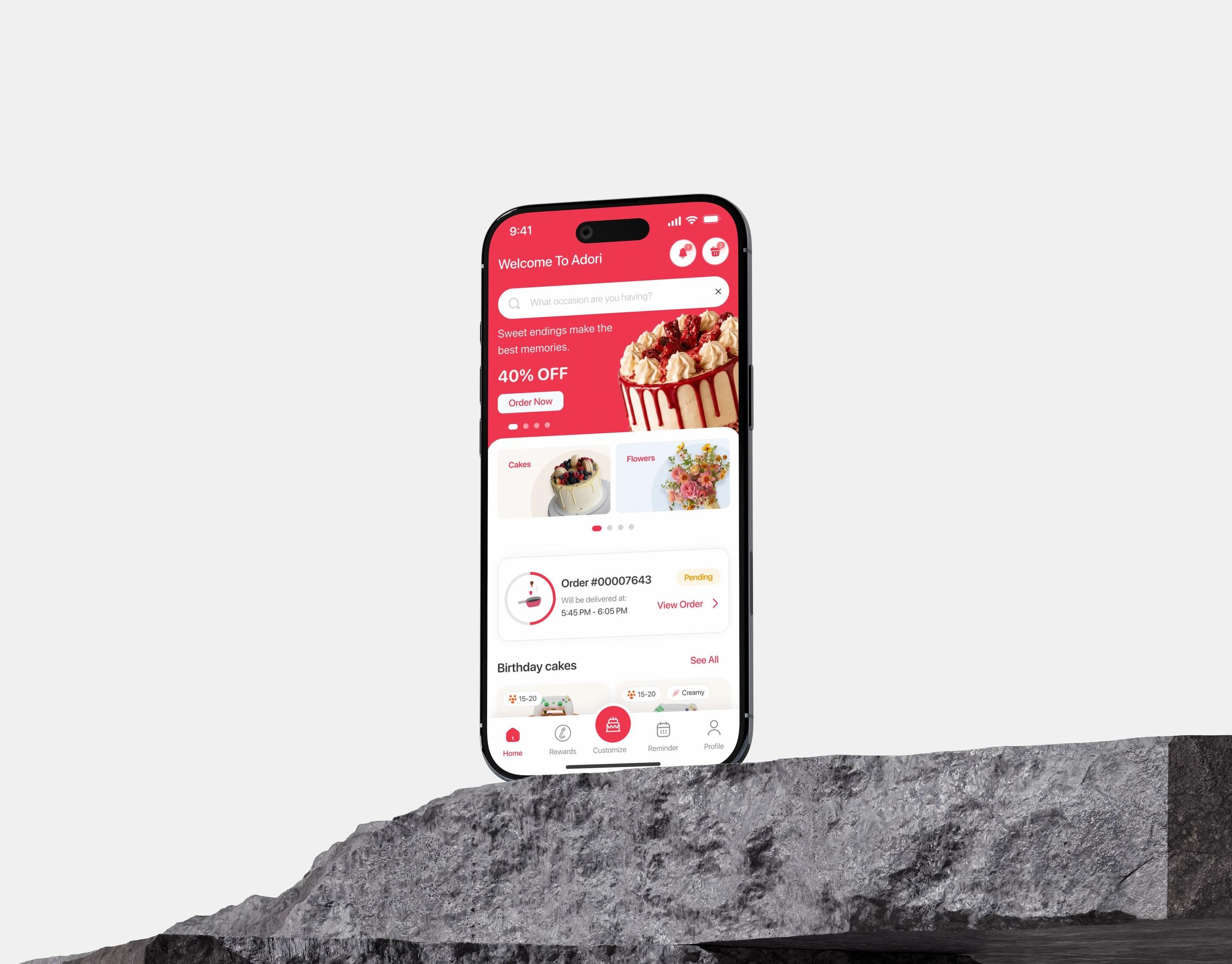
Hidden features are usually a placement problem. In the old Adori, flowers and bundles did not appear on the home screen at all. In the redesign, cakes and flowers sit side by side as the first choice, and bundles and add-ons are offered inside the order flow, at the moment they are relevant.
This is the difference between an upsell that annoys and one that helps: it appears when the customer is already deciding.
Step 5: Build a design system, not a set of screens
A redesign made of individual screens starts to drift the day after launch. Define colours, type, spacing and reusable components once, then build every screen from them. Developers build faster, and the next feature looks like it belongs. More in what a design system is and whether you need one.
For Adori this also carried the new brand: a script wordmark, a bold red and yellow palette and playful 3D illustrations, used consistently through the whole app.
Step 6: Test before you build
Make a clickable prototype of the new main flow and put it in front of real users. Give them a task, stay quiet and watch. You are looking for the places where they hesitate. Fixing a prototype costs hours. Fixing a released app costs weeks.
Step 7: Release in stages and measure
- Agree the numbers first. Decide before launch what you will compare: completed orders, time to finish the main flow, support requests.
- Release to a share of users if your setup allows it, then to everyone.
- Tell users what changed, briefly, the first time they open the new version.
- Keep a way back for the first days: the previous version ready to restore.
- Read the reviews and support messages daily in the first two weeks.
What should you avoid?
The fastest way to lose users in a redesign is to move the thing they came for.
- Redesigning everything at once with no way to tell what helped.
- Changing the look and keeping the broken flow.
- Removing features because the team does not use them, without checking who does.
- Skipping empty, loading and error states, so the new app feels less finished than the old one.
- Designing without the developers. A design that ignores how the app is built is slow and expensive to deliver.
Who did what on Adori
Flowlix designed the new brand identity and the full app experience, from the cake customiser to bundles, checkout, order tracking and loyalty. Our development partner WeDigits built the app. The full story, with the before and after of the home screen, is in the Adori case study.
About Flowlix
Flowlix Studio is a design and development studio in Ismailia, Egypt. We design products and build them: UI/UX design, websites and web apps in React and Next.js, mobile apps in Flutter and React Native, brand identity and e-commerce stores. We work with clients in Egypt, Saudi Arabia, the UAE and Qatar.
Frequently asked questions
How long does an app redesign take?
It depends on the size of the app. Count flows and states, not only screens. For typical timelines see how long it takes to design and build a website or app.
Should I redesign or rebuild?
Redesign when the experience is the problem and the code is healthy. Rebuild when the technology itself blocks you: it is slow, hard to change, or no longer supported.
Will I lose users after a redesign?
Some complaints in the first days are normal, because people dislike change. Lasting loss usually comes from moving or removing the main action. Protecting that is the purpose of step 2.
Do I need new branding to redesign an app?
No. Many redesigns keep the brand and fix the experience. New branding makes sense when the current identity no longer fits the business.
Talk to us
Book a free consultation on WhatsApp. Send us your app, and we will tell you where users are most likely getting stuck and what a redesign would involve, with a fixed quote within 48 hours.